
BROCLI CLOUD / DELIVERY MANAGEMENT
Define where you deliver. Follow what leaves the store.
Clear service areas for your team and customers, with order progress from readiness to delivery.
See how it works ↗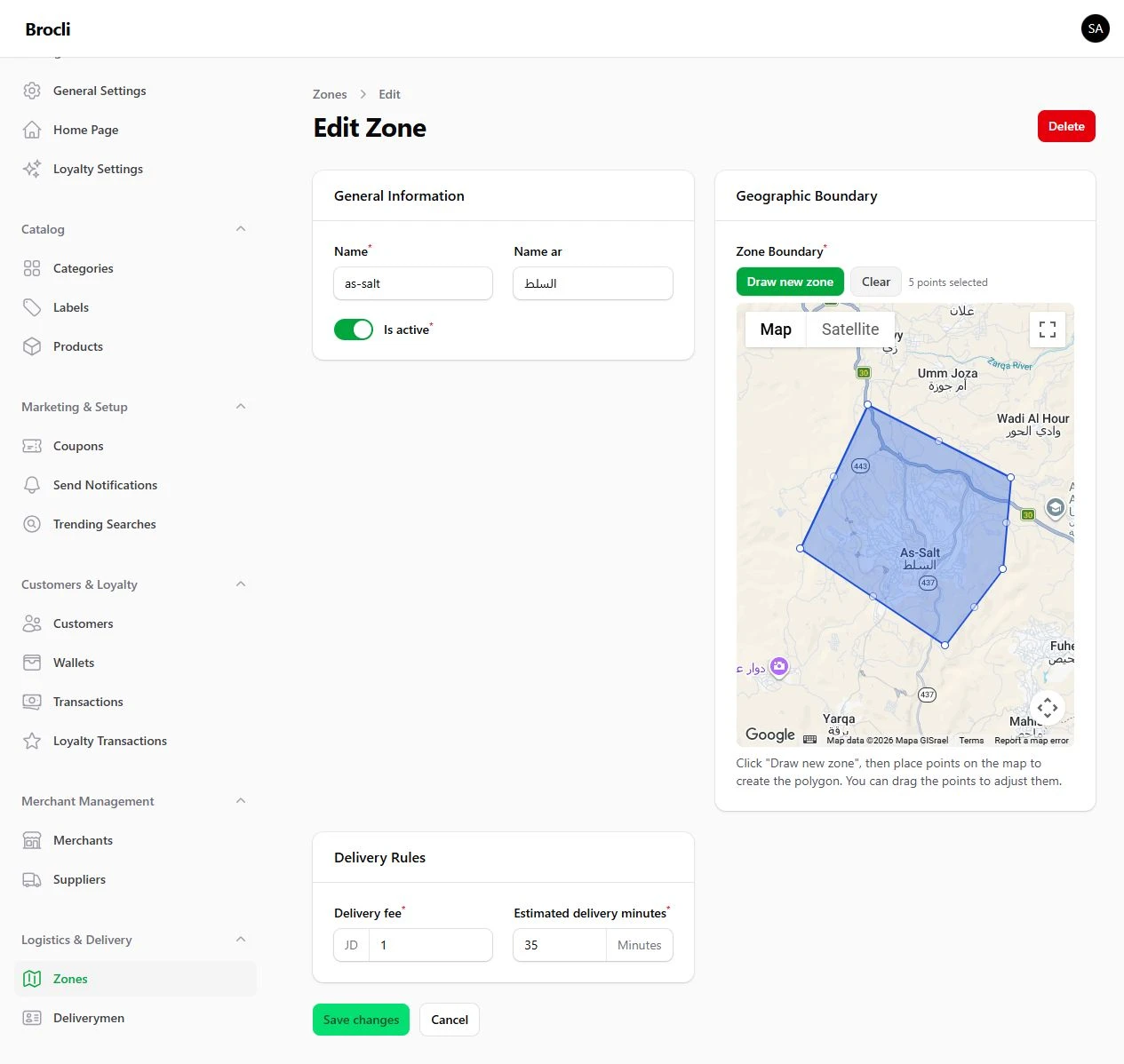
A nearby address can still be hard to serve
Traffic, preparation time and driver availability affect the journey. Start with an area you can serve, then review actual operating time before expanding your promise.
Set rules for each service area
Define area boundaries, delivery charges and estimated delivery time. This helps make coverage clear before accepting an order beyond the planned operation.
Connect the order to a driver
Manage driver information, assign an order and follow readiness, dispatch and delivery status. We demonstrate the driver’s role within the workflow rather than treating a phone image as proof of a feature.
Review your own coverage
Bring a typical delivery address and the location that prepares the order. We can show how service-area setup relates to those requirements. The screenshot is an actual configuration screen.
Questions from store owners
Do you supply drivers?
You manage the delivery team or provider. Brocli Cloud supplies the agreed technology.
Does the system automatically choose the fastest route?
Automatic route optimisation is not presented as a confirmed current feature.
Can charges differ by area?
Delivery rules can be configured by service area.